MT5 trade manager
manage the position, not the dialog box
MetaTrader 5 is built to open and close positions. Managing them while they run is where the work actually is, and where the terminal leaves you doing it by hand. Pulsar is an MT5 trade manager that runs next to MetaTrader 5 and handles the middle part: scaling out across three targets, trailing the stop, moving to breakeven, and sizing from risk instead of lots.
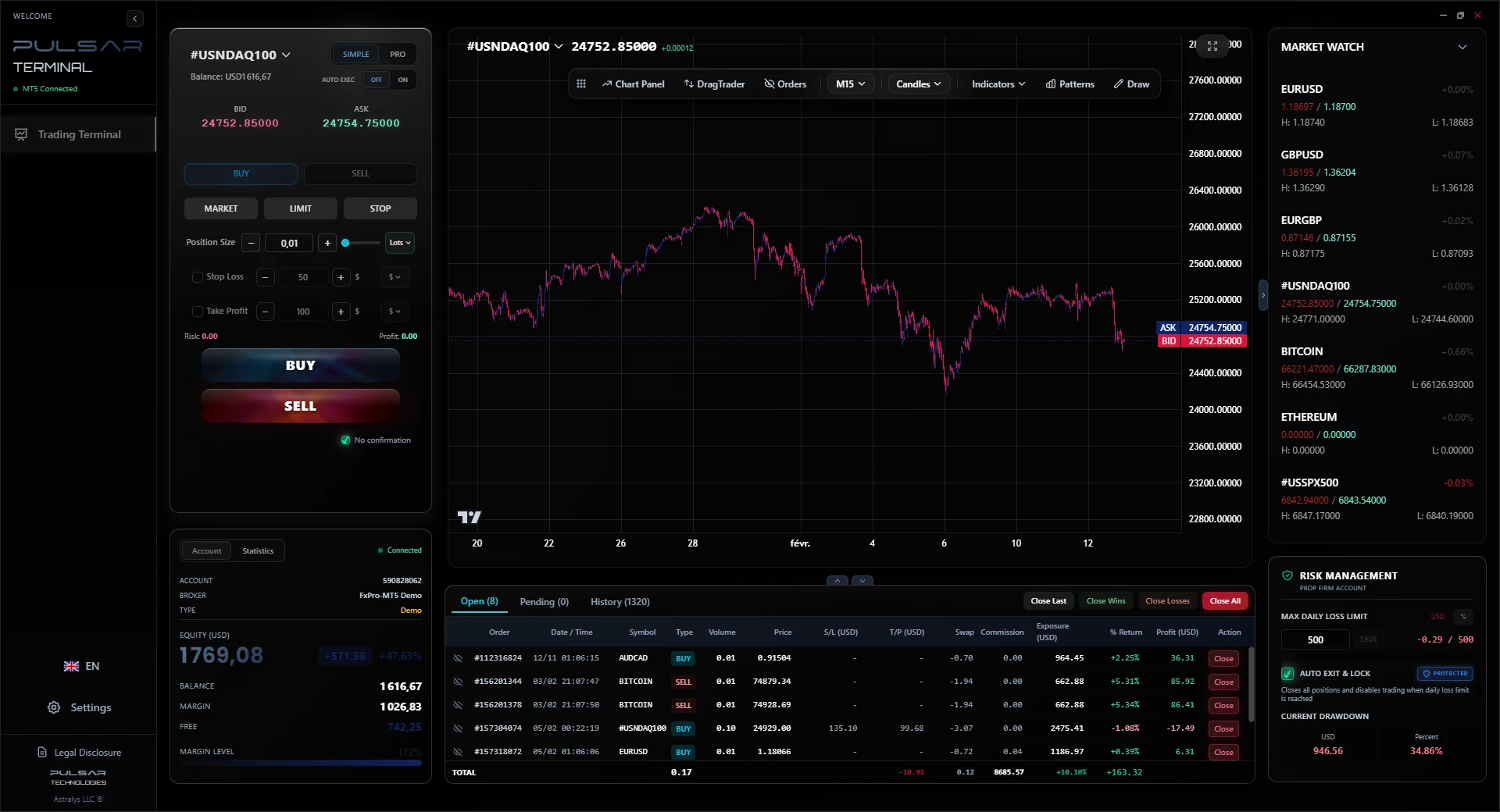
What a trade manager does that MetaTrader 5 does not
Worth being precise here, because most pages on this topic overstate the gap. MetaTrader 5 does more than it gets credit for. It has one-click trading, a stop loss and a take profit on every position, a trailing stop in points from the position menu, and a partial close dialog. The gap is narrower than it looks, and it is entirely in the automatic handling of a position after it is open.
MetaTrader 5 already does this
- One-click entry from the chart toolbar
- One stop loss and one take profit per position
- Trailing stop in points, set from the position context menu
- Partial close, through the order dialog, one at a time
- Charting, indicators and strategy backtesting
It does not do this
- Three take profit levels that close set percentages of the position automatically
- A trailing stop expressed as a currency amount rather than points
- Move the stop to breakeven on its own when a profit threshold is reached
- Compute the lot size from the amount you are willing to risk
- Close everything and block trading when a daily loss limit is hit
- Place a new order by dragging it onto the chart
That list is the entire reason this category of tool exists. Everything below is one of those six gaps.
What you get, with the case each one is for
Every capability below applies to a position you opened yourself. There is no strategy and no signal generation anywhere in the product.
Three take profit levels, with partial closes
Set up to 3 take profit levels on a position and assign the percentage of the position that closes at each one.
Long 0.60 lots on GBPUSD. TP1 at 30 pips closes 50 percent, TP2 at 60 pips closes 30 percent, TP3 at 120 pips closes the rest. Each partial close fires on its own.
You stop having to choose between banking the move and letting it run.
Trailing stop in 3 modes
Trail in pips, at a fixed price distance, or as a currency amount. The stop only ever moves in your favour, never away from price.
Trail 200 USD behind a running position. As profit grows the stop follows, locking in the gain. If price reverses, the stop stays where it was.
Currency mode is how most traders actually think about an open profit. MetaTrader only offers points.
Automatic breakeven
Once the position reaches a profit threshold you set, the stop moves to the entry price by itself.
Set breakeven at 20 pips. The trade runs to 22 pips, the stop jumps to entry, and the worst case on that trade becomes zero.
The decision gets made in advance, in calm conditions, instead of in front of a moving chart.
Risk-based position sizing
Enter the amount or the percentage you are willing to risk and the lot size is computed from your stop distance.
10,000 USD account, 1 percent risk, 25 pip stop on EURUSD gives 0.40 lots. Widen the stop to 50 pips and the size halves to 0.20 lots automatically.
The risk stays fixed at what you decided. The lot size becomes an output rather than a habit.
Drag Trader
Place a new order by dragging it onto the chart, and move stops and targets by dragging the lines.
Drag an entry to the level you want, drag the stop below structure, drag the target to the previous high. No modify window at any point.
MetaTrader lets you drag levels that already exist. It does not let you create the order that way.
Grid entries
Build a ladder of entries at fixed pip or percentage spacing, or on a time interval.
Five entries spaced 15 pips apart below current price, each with its own size, all placed in one action.
Scaling into a level manually means five separate orders and five chances to fat-finger one.
Daily loss limit
Set a maximum loss for the day. When it is reached every position closes and new orders are blocked until the next day.
Limit set at 3 percent of equity. After a run of losses reaches it, positions flatten and the panel stops accepting entries.
It is the only feature here that addresses a sequence of bad trades rather than a single one.
One-click and auto execution
Fire entries in a single click from either the Simple panel or the denser Pro panel, with your sizing and exit rules already attached.
The order goes out with its 3 targets, its trailing rule and its breakeven trigger already configured, rather than being set up afterwards.
The management rules exist from the first second of the trade, not from whenever you get around to it.
It works with the MetaTrader 5 account you already have
No account migration, no broker change, no server-side install. This matters because most traders looking for a trade manager are locked to a broker they cannot easily leave.
Your broker stays your broker
Orders route through your MetaTrader 5 terminal to your broker exactly as they do today. Pulsar is the surface you trade from, not a new counterparty.
A small Expert Advisor and a local bridge
You install a lightweight Expert Advisor in MetaTrader 5 and run the Pulsar desktop app beside it on Windows. They talk locally, with tick updates every 200 ms.
It is not a bot
The Expert Advisor is a data and order bridge. It does not contain a strategy and it does not open positions on its own. You click every entry.
Test it before you commit
Point the 7 day demo at a demo MetaTrader 5 account and run the parts you care about. No payment details are required.
What about an MT4 trade manager?
People search for this in both versions, so it is worth being direct: Pulsar targets MetaTrader 5 and there is no MetaTrader 4 build. If your broker is MT4 only, this is not the tool for you today. If your broker offers both, the MetaTrader 5 account is the one to connect.
MT5 trade manager: common questions
Is this an Expert Advisor or a bot?
+
No. Pulsar is a manual trading terminal. A small Expert Advisor is installed in MetaTrader 5, but its only job is to pass data and orders between the two applications. It holds no strategy and opens nothing on its own. Every entry is a click you make.
Does my broker need to support it?
+
No. It connects to your own MetaTrader 5 terminal on your own machine, so from the broker's point of view the orders arrive from MetaTrader exactly as before. Any broker offering MetaTrader 5 on Windows works.
Can I keep using MetaTrader at the same time?
+
Yes, and you need to: MetaTrader 5 has to be running for the bridge to work. Positions stay in sync both ways, so anything you do in MetaTrader shows up in Pulsar and the reverse.
Does it work on a Mac?
+
Pulsar is a Windows desktop application. On a Mac it needs a Windows environment, in the same way MetaTrader 5 itself does.
What does it cost?
+
Rental only: 30 USD for 6 months, or 49 USD for 1 year which saves 19 percent. There is no lifetime licence. The 7 day demo includes every feature and does not ask for payment details.
Want the detail on each tool? Read the full feature breakdown
Run it on your own charts for a week
Connect the demo to a MetaTrader 5 account and manage a few real setups with it. Three targets and a trailing stop in currency are the two things worth judging first.