Forex risk management tool
size from risk, not from lots
Most losing accounts do not fail on strategy. They fail because the position was too big, the stop was moved, or one bad day was allowed to run. A forex risk management tool takes those three decisions out of your hands and enforces them in the platform. Pulsar sizes each position from the amount you are willing to lose, closes everything when your daily limit is reached, and splits your exits automatically.
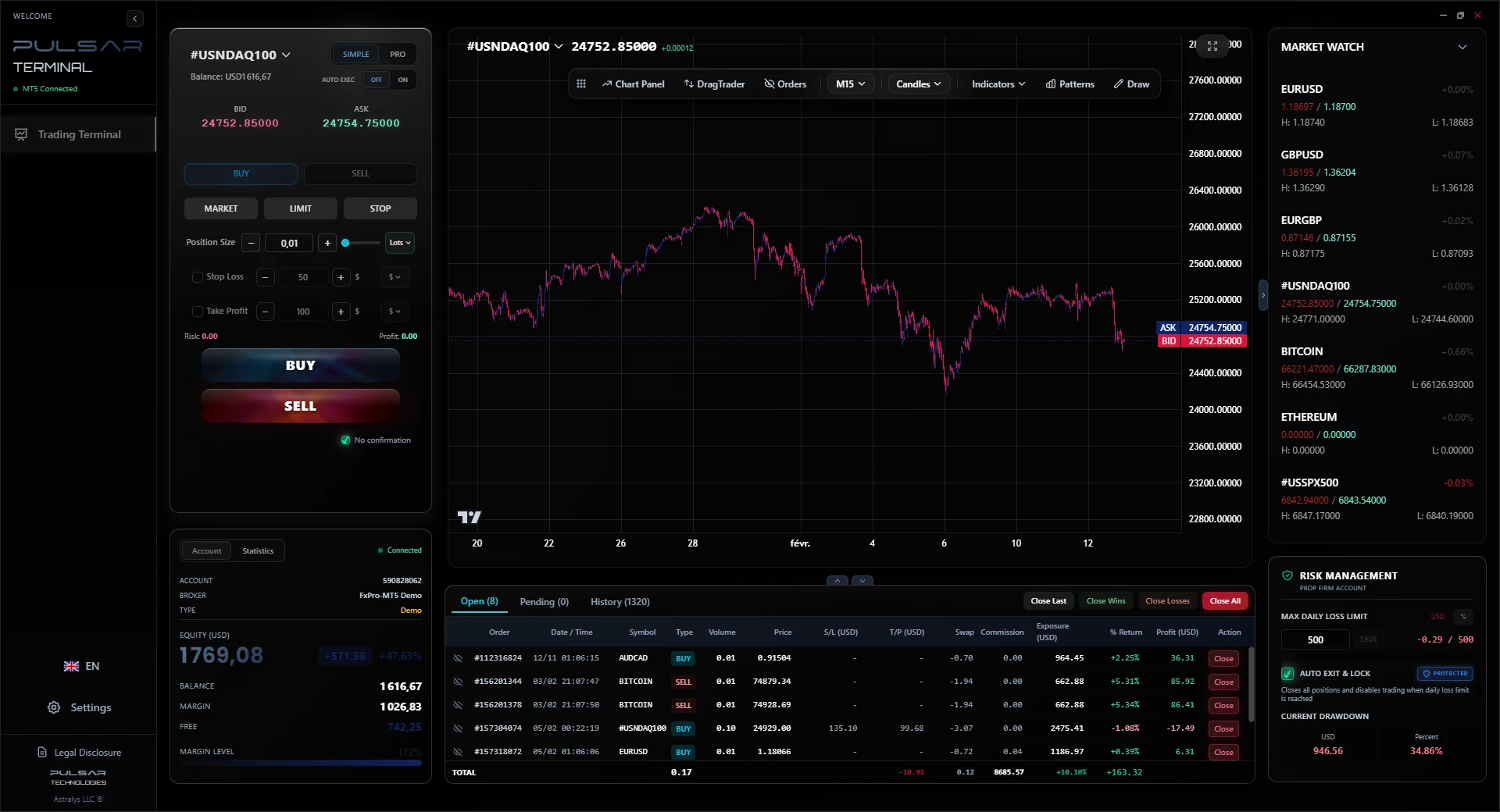
The rules a risk management tool should enforce for you
Every trader knows these rules. Almost nobody follows them under pressure, because following them means doing arithmetic and showing restraint at the exact moment you are least able to. A tool does not get tilted.
Risk a fixed percentage per trade
Decide once that no single trade risks more than 1 percent. The lot size then becomes an output of the stop distance, not a number you type from habit.
Risk-based sizing computes the lot size from your risk amount and your stop.
Cap the damage of a bad day
A run of losses does more harm than any single trade. Without a hard stop for the day, revenge trading turns a 3 percent day into a 12 percent day.
The daily loss limit closes every position and blocks new orders for the rest of the day.
Never widen a stop
Moving a stop away from price converts a planned loss into an unplanned one. The trailing stop only ever moves in your favour.
Trailing stop in 3 modes: pips, price, or a currency amount.
Take risk off the table in stages
Closing part of a position at the first target changes the risk profile of everything that remains, and removes the pressure to be right about the whole move.
Up to 3 take profit levels per position with percentage allocation and automatic partial closes.
Protect a winner before it turns
A trade that reaches a meaningful profit and then returns to entry costs you nothing in money and a great deal in discipline.
Automatic breakeven moves the stop to entry once your profit threshold is reached.
Know the exposure before you click
The number that matters is not the lot size. It is what happens to the account if the stop is hit, expressed in your currency and as a share of equity.
The panel shows the currency risk and the equity percentage before the order is sent.
The core calculation
How risk-based position sizing actually works
This is the calculation the tool runs for you every time you place an order. It is worth understanding even if you never use software for it, because it is the difference between risking what you decided and risking whatever the default lot size happens to be.
MetaTrader 5 asks you for a lot size. But a lot size only tells you your risk once you also know the stop distance and the value of a pip. Type 1.00 lot with a 25 pip stop and you risk 250 USD. Type the same 1.00 lot with a 100 pip stop and you risk 1,000 USD. Same number in the box, four times the exposure.
Worked example
Account of 10,000 USD, risking 1 percent on EURUSD
Account equity
10,000 USD
The tool reads this live, so the size adapts as the account grows or shrinks.
Risk per trade
1 percent = 100 USD
This is the only number you choose. Everything below is derived.
Stop distance
25 pips
Taken from where your stop actually sits on the chart, not from a guess.
Pip value
10 USD per pip, per standard lot
For EURUSD quoted in USD. The tool reads the real contract size per symbol.
Risk of one full lot
25 x 10 = 250 USD
One standard lot would risk two and a half times your limit.
Position size
100 / 250 = 0.40 lots
Rounded to the broker lot step, and checked against the symbol minimum and maximum.
Result
0.40 lots. If the stop is hit, the account loses 100 USD, which is exactly the 1 percent you decided on.
Now move the stop, and watch the size move with it
Widen the stop to 50 pips and one lot now risks 500 USD, so the correct size halves to 0.20 lots. Tighten it to 10 pips and the size rises to 1.00 lot. The risk stays at 100 USD in all three cases. That is the entire point: the stop belongs to the chart, the risk belongs to you, and the lot size is just arithmetic in between.
Pulsar runs this on every order, per symbol, using the contract size, minimum lot, maximum lot and lot step your broker actually reports through MetaTrader 5.
Daily loss limit
The rule that stops a bad day becoming a bad month
Per-trade sizing protects you from one mistake. It does nothing about six mistakes in a row. The daily loss limit is the only mechanism that addresses sequence risk, and it is the rule funded account programs care about most.
What it does
- You set the threshold, as a currency amount or a percentage of the account.
- The tool watches realised and unrealised loss against that threshold continuously.
- When the threshold is reached it closes every open position at market.
- It then blocks new orders for the rest of the trading day.
- The block lifts at the start of the next day, on its own.
What it does not do
- It does not prevent slippage or a gap through your level. It acts on the prices your broker actually provides.
- It does not run when the application is closed. It is a desktop tool, not a server-side rule at your broker.
- It does not decide the threshold for you. A limit set too wide protects nothing.
Most funded account programs enforce a daily loss rule and a maximum drawdown rule, and breaching either usually ends the account. Pulsar helps you stay inside a limit you set yourself. It is an enforcement aid, not a guarantee, and it is not affiliated with any program. Check your own firm's rules on third party tools before using any of them. See the prop firm setup in detail
Exit laddering
Splitting the exit is a risk decision, not a profit decision
A single take profit forces one binary judgement: either the whole move happens or it does not. Splitting the exit changes the shape of the outcome.
Close part, and the rest is free
Take 50 percent off at the first target and move the stop to entry. The remaining half now has no downside against the original risk, so you can let it run without the pressure that usually closes it early.
Three levels, allocated by percentage
Set up to 3 take profit levels per position and assign what share of the position closes at each. Pulsar sends the partial closes for you as each level is reached.
Stops that only tighten
The trailing stop follows price in your favour and never retreats. You can express it in pips, at a fixed price distance, or as a currency amount, which is the mode most traders actually think in.
Breakeven on a threshold you set
Once the position reaches your profit trigger, the stop moves to the entry price automatically. The decision is made in advance, in calm conditions, rather than in front of a moving chart.
Forex risk management tool: common questions
Is this a calculator, or does it actually act?
+
Both, and the second part is what makes it useful. It computes the position size from your risk before the order is sent, and then it enforces the rules afterwards: the daily loss limit closes positions, the trailing stop moves your stop, the breakeven rule triggers, and the partial closes fire at each take profit level. A calculator tells you what you should have done. This does it.
Does it place trades for me?
+
No. Pulsar is a manual trading terminal. You choose the instrument, the direction and the entry, and you click. There is no strategy and no signal generation. The automation applies only to positions you opened yourself: sizing, exits, trailing, breakeven and the daily limit.
Does it work with funded and evaluation accounts?
+
It works with any MetaTrader 5 account on Windows, including evaluation accounts, since it connects to your running MetaTrader 5 terminal rather than to a specific broker. Many programs restrict automated strategies, so it is worth knowing that Pulsar is a manual terminal with risk limits and not an automated system. Check your program's rules on third party tools before you use one.
What if my broker uses different contract sizes?
+
The sizing reads the contract size, minimum lot, maximum lot and lot step that your broker reports for each symbol through MetaTrader 5, so the computed size is always valid for that symbol at that broker. Changing symbol recalculates everything.
What does it cost?
+
The MetaTrader 5 edition is rental only: 30 USD for 6 months, or 49 USD for 1 year which saves 19 percent. There is no lifetime licence. The 7 day demo has the full feature set and does not ask for payment details.
Want the detail on each tool? Read the full feature breakdown
Test it on a demo account first
Set a 1 percent risk, set a daily loss limit, and place a few trades. The sizing and the limit are the two things worth judging before you pay for anything.