MetaTrader alternative
a better interface, on the account you already have
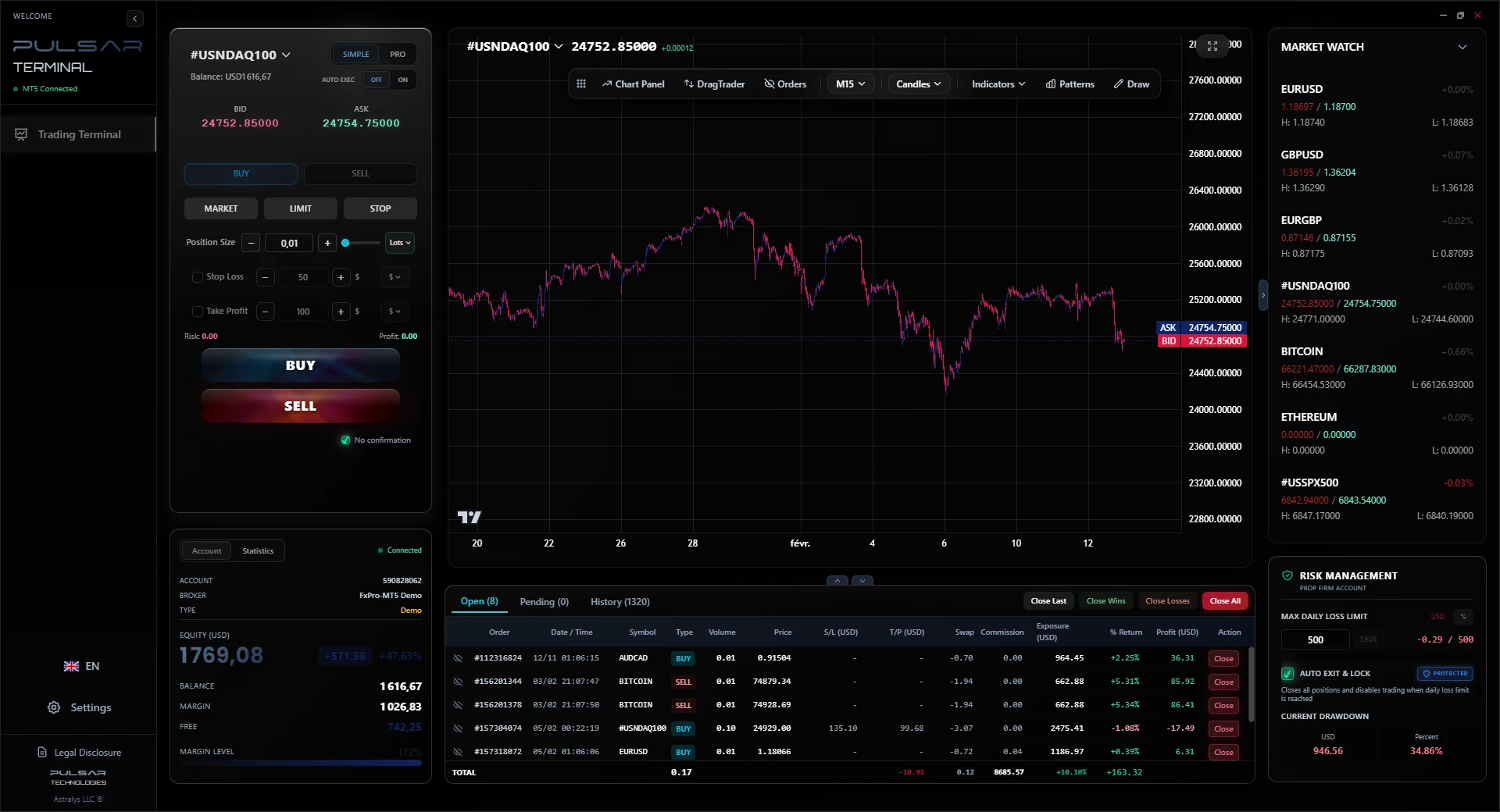
Most traders searching for a MetaTrader alternative are not unhappy with their broker or their execution. They are unhappy with the surface they work from all day. Pulsar Terminal runs alongside MetaTrader 5 rather than in place of it: MetaTrader keeps running, keeps routing your orders and keeps doing what it does well, while you trade from a modern panel on top of it.
Why traders look for a better MetaTrader interface
MetaTrader 5 is excellent at what it was built for: broker connectivity, order routing, automated strategies and backtesting. It was not built around the minute-to-minute work of a discretionary trader, and that is the gap a panel on top of it fills.
Routine actions cost several clicks
Placing an entry, shifting a target or scaling out are all a few dialogs deep, which adds up over a trading day.
One stop loss, one take profit
A position carries a single stop and a single target, so scaling out at two or three levels has to be managed by hand.
No built-in daily loss limit
Nothing in the terminal closes your positions and stops you trading when you hit a loss cap, which is exactly what prop firm rules demand.
Sizing in lots, not in risk
You type a lot size, so the amount you actually risk depends on a calculation you run outside the platform.
Order changes go through a dialog
Placing an entry or shifting a target usually means opening the modify window rather than dragging the level where you want it.
The workspace is fixed
MetaTrader 5 now ships light and dark schemes, but the layout itself is not something you rearrange around how you actually trade.
Pulsar runs alongside MetaTrader 5, not instead of it
This is the part worth being clear about, because it is what most people assume wrongly. Nothing is taken away from your setup. MetaTrader 5 stays installed, stays connected and stays in charge of execution.
Your broker, your account, your execution
MetaTrader 5 remains installed and running. Every order still routes through it to your broker, exactly as it does today.
Who it is for
Traders who do not want to move accounts, change broker, or learn a different platform.
How it connects
Pulsar talks to your running MetaTrader 5 terminal through a local bridge on your own machine.
- Your broker relationship is untouched, and so are your spreads and your account terms
- No account migration, no re-verification, no server-side installation
- MetaTrader keeps its strengths: strategy backtesting, Expert Advisors, its own charting
- You can keep using MetaTrader directly at any time, both stay in sync
- Nothing is uninstalled and nothing is replaced
MetaTrader 5 stays free, as it always was. Pulsar sits on top.
See how it connectsThe layer MetaTrader leaves to you
The work that happens after a position is open, handled automatically instead of by hand.
Who it is for
Discretionary traders who manage positions actively rather than setting and forgetting.
How it connects
Runs beside MetaTrader 5 on Windows, with tick updates every 200 ms.
- Up to 3 stop loss and 3 take profit levels per position, with percentage allocation and partial closes
- A daily loss limit that closes every position and blocks trading for the rest of the day
- Risk-based sizing, trailing stop in 3 modes, automatic breakeven and grid entries
- Place and move orders by dragging directly on the chart
- 7 themes, Volume Profile, Market Profile, drawing tools and chart patterns
Rental only: 30 USD for 6 months or 49 USD for 1 year. Free 7 day demo, no card.
Try the 7 day demoMetaTrader 5 on its own, and MetaTrader 5 with Pulsar
What actually changes when you add the panel. MetaTrader 5 already covers the basics well, so the table only marks a difference where there genuinely is one, and it keeps the credit where it is due.
| Capability | MetaTrader 5 alone | MetaTrader 5 + Pulsar |
|---|---|---|
| One-click execution | Yes, built in | Yes, plus auto-execution |
| Stop loss and take profit levels | Yes, one of each per position | Up to 3 of each, with percentage allocation and partial closes |
| Place and move orders by dragging on the chart | Existing levels can be dragged, new orders go through a dialog | Place and move orders by dragging |
| Trailing stop | Yes, in points, from the position menu | 3 modes: pips, price, USD |
| Automatic breakeven | Not built in, needs an EA or a manual edit | Yes, at a profit threshold you set |
| Daily loss limit that closes positions | Not built in | Closes everything, then blocks trading for the day |
| Risk-based position sizing | Not built in, you enter the lot size | Size from the risk amount instead of the lot count |
| Volume Profile and Market Profile | Not native, needs a third party indicator | Built in |
| Interface themes | Chart colour schemes | 7 full themes |
| Strategy backtesting and Expert Advisors | Yes, the Strategy Tester | Unchanged, still done in MetaTrader |
Automated strategy backtesting, Expert Advisors and the Strategy Tester stay MetaTrader strengths, and Pulsar does not touch them. It is a manual trading terminal, not a strategy tester. Compare plans and pricing
MetaTrader alternative: common questions
Do I have to leave MetaTrader or change broker?
+
No, and that is the point. MetaTrader 5 stays installed and running, your account and your broker do not change, and every order still routes through MetaTrader to your broker exactly as it does today. Pulsar connects to your running terminal through a local bridge on your own machine and becomes the surface you work from. If you close Pulsar, you carry on in MetaTrader as before.
Is this a trading bot?
+
No. Pulsar is a manual trading terminal. It does not open positions on its own and it contains no strategy. The automation it does have applies to positions you opened yourself: trailing stop, automatic breakeven, the daily loss limit, and grid entries that you configure and start.
Does it work with my MT5 account?
+
It works with a MetaTrader 5 account at any broker, on Windows. You install a small Expert Advisor in your MetaTrader 5 terminal and run the Pulsar desktop app next to it. Prices, positions and orders stay in sync locally, with tick updates every 200 ms.
What does it cost?
+
The MT5 edition is rental only: 30 USD for 6 months, or 49 USD for 1 year which saves 19 percent. There is no lifetime licence. The platform edition is 14 USD per month for simulation, 89 USD per month with a broker connection, and 350 USD per month over FIX. White label pricing is on request.
Can I test it first?
+
Yes. The demo runs for 7 days with the full feature set and no payment details. Connect it to a demo MetaTrader 5 account and test the parts that matter to you: multi-level exits, the daily loss limit, and sizing from risk instead of lots.
Want the detail on each tool? Read the full feature breakdown
Try it next to your MetaTrader account
The 7 day demo is the complete terminal. Point it at a demo MetaTrader 5 account and judge it on your own charts, with nothing else in your setup changing.