Prop firm trading tool
stay inside the limit you were given
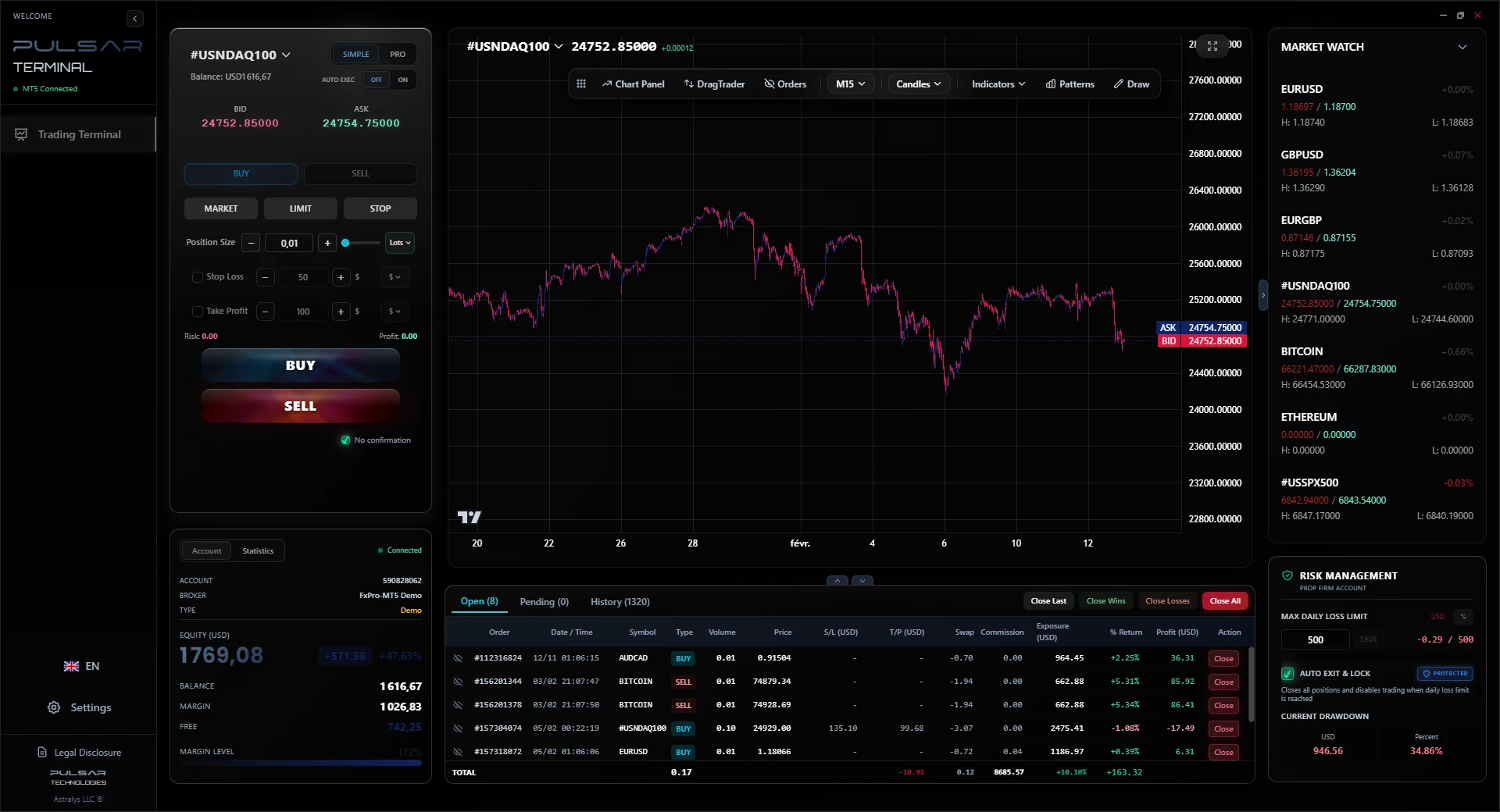
Most funded accounts are not lost on a bad strategy. They are lost on a single day where the daily loss rule was breached before the trader stopped. Pulsar is a manual trading terminal for MetaTrader 5 with a hard daily loss limit built into it: you set the threshold, and when it is reached every position closes and the panel stops accepting orders until the next day.
The rules that end most funded accounts
Program rules vary and yours are the ones that matter, but three constraints appear in almost every set. It is worth understanding exactly how each one is measured, because they fail in different ways.
Daily loss limit
A cap on how much the account may lose in a single trading day, usually measured against the balance or equity at the day's start. Most programs count unrealised loss too, which is why an open position sitting underwater can breach the rule before you have closed anything.
Fails through sequence: several losses in a row, then a larger position to recover them.
Maximum drawdown
A floor under the account, either fixed at the starting balance or trailing the highest equity reached. The trailing variant is the stricter one, because profit raises the floor and never lowers it again.
Fails slowly: a series of small losses after a good run, with the floor now much higher than the starting balance.
Consistency requirements
Some programs cap how much of the total profit may come from a single day or a single trade, to filter out accounts that got lucky once. This one is not about losses at all.
Fails on a win: one outsized day that makes the rest of the record look incidental.
Pulsar addresses the first of these directly, and helps with the second through position sizing. It does not manage consistency requirements, which are a function of how you trade rather than of tooling.
Daily loss limit
How the limit actually works
This is the core of the page, so it is worth being exact about the mechanism rather than describing it in marketing terms.
What it does
- You set the threshold yourself, as a currency amount or as a percentage of the account.
- It tracks realised and unrealised loss against that threshold continuously while the app runs.
- When the threshold is reached it sends a close order for every open position at market.
- It then blocks new orders from the panel for the rest of the trading day.
- The block releases at the start of the next trading day, without you having to do anything.
What it does not do
- It does not guarantee you stay inside your program's rule. It acts on the prices your broker provides, and slippage or a gap can carry the account past your threshold before the closes fill.
- It does not run when the application is closed. This is a desktop tool on your machine, not a rule enforced on the broker's server.
- It does not know your program's rules. It enforces the number you enter, so a threshold set wider than your program's limit protects nothing.
- It does not manage maximum drawdown or consistency rules.
Set your threshold below the limit your program enforces, not equal to it. The gap is what absorbs slippage.
Position sizing
Sizing from risk, on an account size you did not choose
Challenge accounts come in fixed sizes, and the lot size that was right on your personal account is rarely right on a 50,000 or 200,000 account with a 4 percent daily rule. Sizing from a percentage removes that translation step.
Risk as a percentage, not a lot count
Enter the share of the account you are willing to risk on the trade. The lot size is computed from your stop distance and the symbol's contract size, and it changes automatically when you change account.
The size follows the stop
Widen the stop and the position shrinks so the risk stays constant. On a funded account this is what keeps a wider-stop setup from quietly doubling your exposure to the daily rule.
Exposure shown before you send
The panel shows what the trade costs in currency and as a share of equity before the order goes out, so the decision is made against the rule rather than against a lot number.
Exits laddered across three levels
Up to 3 take profit levels with percentage allocation and automatic partial closes. Taking part of the position off early reduces what remains exposed to a daily rule breach.
Important
This is a manual terminal, not an automated system
Worth stating plainly, because it is the question every funded trader has to answer for their own program.
You click every entry
Pulsar contains no strategy, no signals and no entry logic. It does not analyse the market and it does not decide to open a position. Every trade starts with you.
The automation is risk handling on your own trades
Trailing stop, breakeven, partial closes at your take profit levels, and the daily loss limit. All of it applies to positions you opened and configured yourself.
There is an Expert Advisor, and here is what it does
A small Expert Advisor is installed in MetaTrader 5 to pass prices and orders between MetaTrader and the Pulsar desktop app. It is a bridge. It holds no trading logic and opens nothing on its own.
Check your own program's rules first
Programs differ in what they allow regarding third party tools, and the responsibility for compliance is yours. Read your program's terms on external tools and risk management software before installing anything, this one included.
Pulsar is not affiliated with, endorsed by, or partnered with any proprietary trading firm or funded account program. Nothing here is a guarantee that you will pass an evaluation or remain within any program's rules.
Prop firm trading tool: common questions
Is this an Expert Advisor?
+
Pulsar itself is a Windows desktop application, not an Expert Advisor. It does install a small Expert Advisor in MetaTrader 5, whose only job is to pass data and orders between the two programs. That bridge contains no strategy and never opens a position by itself. If your program's question is whether an automated strategy is trading the account, the answer is no.
Will my prop firm allow it?
+
That depends on your program and you need to check its terms yourself. What we can tell you precisely is what the tool is, so you can answer their question accurately: a manual execution terminal with risk limits, connected to your own MetaTrader 5 terminal, with no strategy automation and no trade copying. If you are unsure, ask your program's support before installing it.
Does it guarantee I stay within the rules?
+
No, and be sceptical of anything that claims otherwise. It closes positions at market when your threshold is reached, so slippage, a gap, or a fast market can still carry the account past the level. It is an enforcement aid that removes the need for you to notice and act. Set your threshold below your program's actual limit so there is room to absorb that.
Does it work on evaluation and funded accounts?
+
It works with any MetaTrader 5 account on Windows, since it connects to your running MetaTrader 5 terminal rather than to a particular broker. Evaluation accounts and funded accounts on MetaTrader 5 work the same way as any other account.
What happens if I close the application?
+
The limit stops being enforced, because the monitoring runs in the desktop app on your machine. Positions already open stay open with whatever stop loss and take profit are attached to them at the broker. This is why the stop loss on each position still matters and the daily limit is a second layer, not a replacement.
What does it cost?
+
Rental only: 30 USD for 6 months, or 49 USD for 1 year which saves 19 percent. There is no lifetime licence. The 7 day demo has every feature and asks for no payment details, so you can test the daily limit on a demo account before deciding.
Want the detail on each tool? Read the full feature breakdown
Test the limit before you rely on it
Run the demo on a MetaTrader 5 demo account, set a small daily threshold, and trade into it deliberately. Watching it flatten and lock the panel is the only way to know you trust it.